ArtCraft FigCraft: Features & Downloads
ArtCraft FigCraft: Design interfaces with auto layout, reusable components and interactive prototypes. Learn about early-alpha limitations, desktop downloads and the WebAssembly build to host yourself.
FigCraft is part of the Crafting Apps family developed by the ArtCraft team. Design interfaces with auto layout and reusable components, then connect screens into prototypes.
Information as of 2026-10-14
Based on ArtCraft documentation, not hands-on testing.
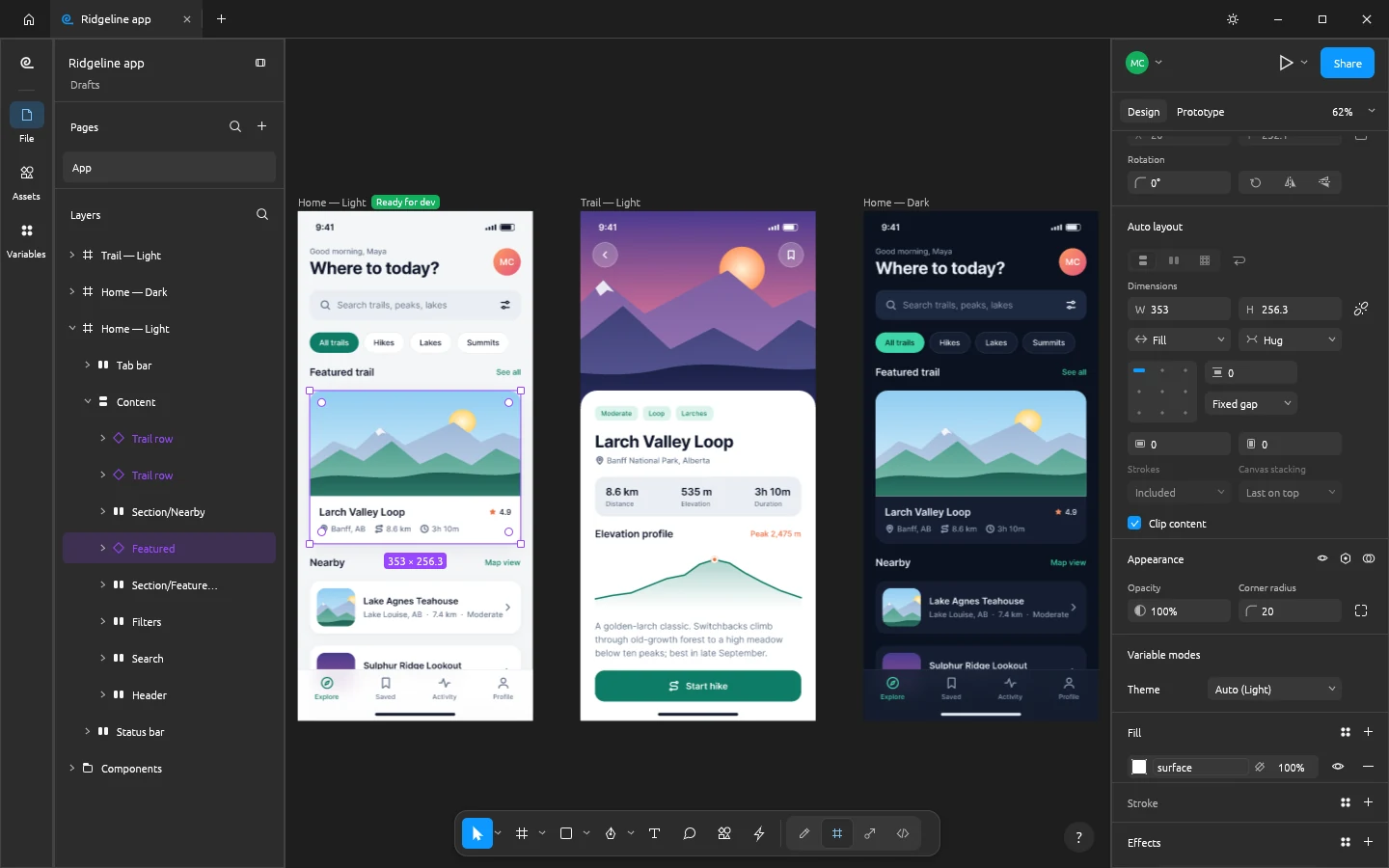
Frames and auto layout
Arrange interface screens in frames with padding, gaps and wrapping. Hug, Fill and Fixed sizing help a layout respond as text and components change. In FigCraft, start with a small phone screen, build a reusable card, then check how the layout behaves with longer labels.
Components and variants
Reuse components, preserve instance overrides and group variants in component sets. Styles and variables with modes let you maintain consistent colors and switch between light and dark interface designs.
Prototypes and handoff
Connect screens with interactions and animated transitions, then preview the flow in presentation view. Dev Mode provides measurements, annotations and generated code to help developers understand the design. Check the generated output against the behavior you intend before putting it in an application.
What can you use FigCraft for?
- Design a mobile app interface with reusable cards and buttons.
- Connect onboarding screens into a clickable prototype.
FigCraft is in early alpha. Try a small project and keep backups before moving important interface files. Check component overrides, fonts, prototype interactions and generated code in your own workflow. The WebAssembly download is a build to host yourself, rather than a hosted editor link.
Read the license (opens in a new tab / 新窗口打开)Download and install FigCraft
Install and update with ArtCraft Launcher, or open the official product page and find “Option 2 · Standalone” in the download section for standalone installers.
- Follow the link below to the official FigCraft download page. To manage several apps in one place, install Launcher first.
- Choose the installer for your operating system and follow the instructions on the page. Check the system requirements on the official page and the file format limitations here before downloading.
- Make a copy of your files and try a small project. You could start with this: Design a mobile app interface with reusable cards and buttons.
The Web version here is a WebAssembly build that you need to host yourself. The official product page provides the download package.